


Invoice Delivery
Send sales invoices and GST documents from Miracle to customers on WhatsApp with PDF attachments.
Send invoices, challans, builty PDFs, ledger statements, and payment reminders from Miracle through Whats91 Cloud API.
Whats91 gives Miracle Accounting Software users a clean POST endpoint that accepts approved template details, Miracle field placeholders, and Base64 PDF attachments without QR-based WhatsApp Web sending.
Confirm the features enabled for your account, your software version, sender and template eligibility, and integration prerequisites before applying this setup. The examples explain a workflow; they do not confirm access, delivery or a customer result.
Miracle WhatsApp Software integration is the process of connecting Miracle Accounting Software with an official WhatsApp API provider so accounting teams can send transactional documents automatically. With Whats91, Miracle sends a JSON POST request to a custom endpoint, Whats91 validates the template and attachment fields, and the customer receives an approved WhatsApp template with the correct PDF document.
Use Cases
Map the document, recipient, template and attachment fields for each accounting task.
Send sales invoices and GST documents from Miracle to customers on WhatsApp with PDF attachments.
Attach Simple Challan, full-page invoices, e-way bill copies, and transport documents using Miracle Base64 fields.
Use approved utility templates for payment reminders, balance follow-ups, and account statement nudges.
Confirm payments, share ledger statements, and reduce manual accounting calls from regular parties.
How to Implement
Use this implementation checklist for Miracle Web API profile setup, template mapping, PDF attachment delivery, and test sending through Whats91.
Create and approve the required WhatsApp utility template in Whats91 or Meta. Keep variables aligned with Miracle fields such as party name, bill number, amount, and bill date.
Create an integration token in your enabled Whats91 account. Replace YOUR_WHATS91_API_TOKEN only in your private Miracle configuration. Keep the token out of messages and shared documents.
In Miracle, add a WhatsApp Web API profile and set the POST URL to https://graph.whats91.com/api/custom/miracle/send-template.
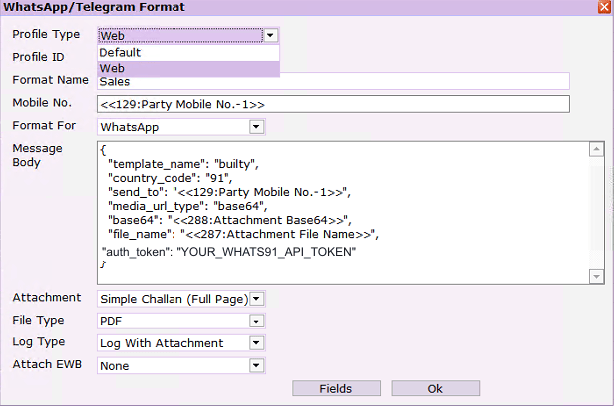
Set Profile Type to Web, select WhatsApp as the format, and paste the JSON body with Miracle placeholders for mobile number, attachment Base64, and file name.
Select the required attachment format, choose PDF as file type, use Log With Attachment, and save the format for invoice or challan sending.
Send a test invoice or builty to a controlled number, confirm template delivery, validate the attached PDF, and review Whats91 logs for request or template errors.
Note: Miracle may call this profile "WhatsApp Web API", but Whats91 delivery uses the official WhatsApp Cloud API and does not require QR login.
Existing Setup Image 1
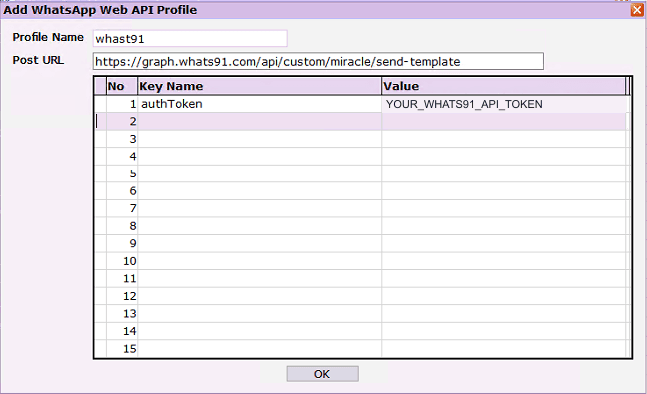
Scroll horizontally to read the configuration. The setup steps and JSON examples explain the same fields in text.
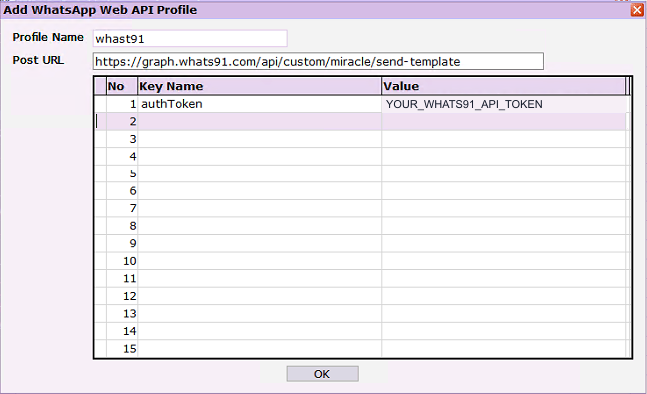
Existing Setup Image 2
Scroll horizontally to read the configuration. The setup steps and JSON examples explain the same fields in text.
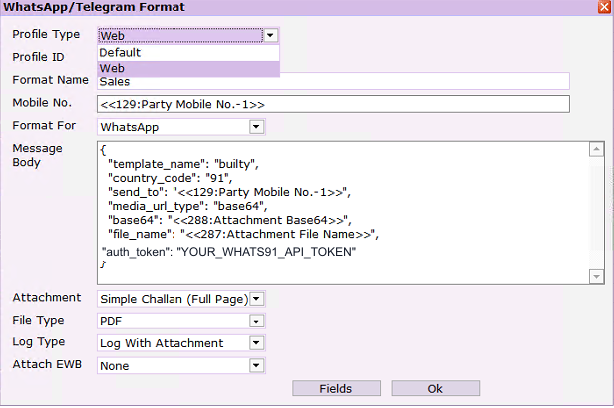
Existing setup image with a placeholder token. It shows the visible configuration only; it does not establish current availability or delivery.
JSON Payload
Replace placeholders in your private configuration. Map the recipient, template and PDF fields before sending a controlled test.
{
  "template_name": "builty",
  "country_code": "91",
  "send_to": "<<129:Party Mobile No.-1>>",
  "media_url_type": "base64",
  "base64": "<<288:Attachment Base64>>",
  "file_name": "<<287:Attachment File Name>>",
  "auth_token": "YOUR_WHATS91_API_TOKEN"
}{
"auth_token": "YOUR_WHATS91_API_TOKEN",
"template_id": "YOUR_TEMPLATE_ID_OR_NAME",
"country_code": "91",
"sender_id": "YOUR_WHATSAPP_PHONE_NUMBER_ID",
"send_to": "<<129:Party Mobile No.-1>>",
"template_argument1": "<<083:Party Name>>",
"template_argument2": "<<114:Bill No>>",
"template_argument3": "<<105:Bill Amount>>",
"template_argument4": "<<104:Bill Date>>",
"media_url_type": "base64",
"base64": "<<288:Attachment Base64>>",
"file_name": "<<287:Attachment File Name>>"
}Use YOUR_WHATS91_API_TOKEN in shared examples. Store the real token only in your private configuration and rotate it if it is exposed.
Field Reference
The Whats91 Miracle endpoint accepts clear field names and several Miracle-friendly aliases so setup can match the fields available in your Miracle build.
| Field | Required | Aliases | Notes |
|---|---|---|---|
| auth_token | Required | authToken, token | Whats91 API token. Keep it in Miracle configuration only and rotate exposed tokens. |
| template_id | Required | template_name, templateName | Use the Whats91 template ID, Meta template ID, or approved template name such as builty. |
| country_code | Required | - | Use 91 for India unless the recipient is in another country. |
| send_to | Required | mobile, receiver, phone | Recipient mobile field from Miracle. The message is sent to this value, not the log-only mobile field. |
| sender_id | Recommended | senderId, sender | WhatsApp sender or phone number ID when your account uses multiple senders. |
| template_argument1... | As needed | - | Use one field per approved template variable for party name, bill number, amount, date, and company name. |
| media_url_type | For attachments | - | Use base64 for Miracle PDF attachment fields or url when using a public document link. |
| base64 / file_name | For Base64 PDFs | fileName, filename | Use Miracle attachment placeholders such as <<288:Attachment Base64>> and <<287:Attachment File Name>>. |
Troubleshooting
Most setup problems are caused by token placement, template mismatch, blank recipient fields, or attachment settings. Use Whats91 logs to confirm the exact error code.
Cause: Token key is missing or named incorrectly.
Fix: Add auth_token in the JSON body or Miracle key-value profile. authToken and token are accepted aliases.
Cause: No template_id or template_name was sent.
Fix: Send the approved Whats91 template ID, Meta template ID, or approved template name.
Cause: Template value does not match an approved template.
Fix: Check spelling, language, category, approval status, and account ownership in Whats91.
Cause: Recipient mobile number is blank after Miracle field substitution.
Fix: Map send_to to the correct party mobile field and test with a party that has a valid number.
Cause: Recipient mobile has spaces, invalid digits, or wrong country code.
Fix: Use country_code 91 and keep send_to as the 10-digit Indian mobile number where possible.
Cause: Attachment Base64 is empty, truncated, or not a PDF payload.
Fix: Select PDF file type and Log With Attachment in Miracle, then retry with a generated document.
Cause: A Base64 attachment was sent without a file name.
Fix: Add file_name with Miracle's attachment file-name placeholder.
Cause: WhatsApp delivery failed after request validation.
Fix: Review Whats91 logs for template status, sender health, phone quality, and recipient eligibility.
Why Whats91
Miracle users often start with WhatsApp Web sending, but official API delivery is more stable for accounting documents, recurring templates, and audit-friendly communication.
Use approved utility templates for invoices, statements, dispatch updates, and payment confirmations.
The custom endpoint accepts Miracle JSON, key aliases, Base64 PDF fields, and template arguments.
Designed for distributors, textile traders, commission agents, manufacturers, and wholesalers using Miracle.
Technical definition
Miracle Web API is the external integration mechanism used by Miracle Accounting Software to send structured data from an accounting workflow to another application over HTTP. In a WhatsApp integration, Miracle Web API acts as the request source. It collects the selected accounting fields, document details, party mobile number, template values, and attachment data, then submits them to a configured API endpoint. The endpoint can belong to a messaging provider, middleware service, ERP connector, reporting system, CRM, or custom business application.
In practical terms, Miracle Web API lets Miracle Accounting Software communicate with systems outside the desktop accounting environment. A user or configured workflow can generate an invoice, challan, builty, ledger statement, receipt, or reminder, and Miracle can pass the required values to an external API. The external system receives the request, validates it, performs the next action, and returns a response. The core function is structured data exchange from Miracle to another system.
Miracle Web API works by using a profile configuration inside Miracle. The profile stores the request URL, optional key-value settings, and the message body format. For WhatsApp delivery through Whats91, the configured POST URL is https://graph.whats91.com/api/custom/miracle/send-template. The body is JSON. Miracle replaces field placeholders with live accounting values before sending the request. For example, the party mobile placeholder becomes the recipient number, the bill number placeholder becomes a template variable, and the attachment Base64 placeholder becomes the PDF document payload.
External integrations depend on predictable field mapping. A Miracle Accounting API request should identify the recipient, the approved template, the country code, the template variables, and any attachment fields. Whats91 accepts both clear field names and common Miracle-friendly aliases so the setup can match the fields available in a specific Miracle build. When the request reaches Whats91, the platform checks the token, sender account, template reference, phone number, attachment format, and file name. Only after validation does Whats91 send the message through WhatsApp Cloud API.
Webhook and API workflows are different parts of the integration lifecycle. Miracle sends an outbound API request to Whats91. Whats91 then communicates with the WhatsApp Cloud API and receives delivery status callbacks from Meta. The business does not need to maintain a WhatsApp Web browser session or keep a QR login active. Delivery events, validation failures, phone errors, template problems, and attachment errors can be reviewed through Whats91 logs. Those logs are useful for accounting teams because they separate Miracle field issues from WhatsApp delivery issues.
Accounting automation workflows usually start from a document or account event. An invoice is generated, a challan is prepared, a builty PDF is created, a ledger statement is requested, or a payment reminder is due. Miracle Web API gives that event a technical path to Whats91. Whats91 then connects the event to approved WhatsApp templates, document attachments, and official sender delivery. For follow-up logic, teams can combine Miracle document sending with Flow Builder automation when a response needs to start a reminder, support handoff, or collection workflow.
Whats91 integrates with Miracle Web API by exposing a Miracle-specific endpoint that understands Miracle field placeholders, Base64 PDF values, template aliases, and common JSON naming differences. Miracle remains the accounting source. Whats91 becomes the delivery, validation, logging, and WhatsApp Cloud API layer. This separation is important: accounting data stays structured in Miracle, while Whats91 handles the messaging rules required by the Meta Business Platform.
A well-configured Miracle Web API integration should be treated like a document workflow, not just a message button. The request should prove which accounting event created the message, which customer should receive it, which approved template applies, which PDF belongs to the transaction, and how failures should be traced after sending. That structure is what makes Miracle WhatsApp API useful for recurring accounting automation.
Connection flow
The integration path is Miracle -> API Request -> Whats91 -> WhatsApp Cloud API -> Customer.
Miracle
API Request
Whats91
WhatsApp Cloud API
Customer
Miracle Accounting Software connects to WhatsApp by sending a document-aware API request to Whats91. The request begins inside Miracle, where the accounting record already contains the party, bill number, GST invoice details, challan details, builty reference, ledger balance, amount, date, and document attachment. Miracle substitutes field placeholders into the JSON body and sends the request to the Whats91 custom Miracle endpoint.
Step one is document generation. A user creates or selects an invoice, GST invoice, challan, builty, ledger statement, receipt, or payment reminder inside Miracle. Step two is API preparation. Miracle reads the configured WhatsApp Web API profile, applies the POST URL, replaces placeholders such as party mobile number and attachment Base64, and prepares a JSON payload. Step three is Whats91 validation. Whats91 checks the authentication token, template name or ID, country code, recipient mobile number, template arguments, PDF attachment, and file name.
Step four is WhatsApp Cloud API delivery. After validation, Whats91 sends the approved template message through the configured WhatsApp Cloud API sender. If the message includes a PDF, Whats91 converts the Base64 attachment into the document delivery format expected by WhatsApp. Step five is customer receipt. The customer receives the message on WhatsApp with the approved template text and the attached invoice, challan, builty, ledger, or statement PDF.
This flow supports invoice delivery and GST invoice delivery because the template can carry structured bill details while the PDF carries the formal accounting document. It supports challan and builty delivery because transport or dispatch PDFs can be sent with the same attachment mapping. It supports ledger statements and payment reminders because the message can include outstanding amount, party name, due date, and account context. For broader collection workflows, the integration can connect naturally with payment reminder automation.
Customer communication becomes more consistent because the sender, template, document, and accounting fields are controlled by configuration. Teams can also combine this document flow with WhatsApp Chat Shortcuts when customers need quick replies such as Track My Order, Request Invoice, or Talk to Support. If a reply requires automation, the response can be routed into chatbot flows or a human support path.
The important technical point is that Miracle does not send the WhatsApp message directly to the customer. Miracle sends an API request to Whats91. Whats91 manages the WhatsApp Cloud API requirements, approved template use, attachment handling, sender configuration, delivery logs, and error handling. This makes the setup more reliable than a WhatsApp Web session and more appropriate for accounting teams that send high volumes of PDFs throughout the day.
For invoice delivery, the transaction source is the Miracle invoice record. For GST invoice delivery, the PDF attachment is the tax document generated from Miracle. For challan and builty delivery, the PDF usually represents dispatch or transport proof. For ledger statements, the attachment or template values summarize account activity. For payment reminders, Miracle provides party and balance context, while Whats91 sends the reminder through an approved template. Each case follows the same integration pattern: Miracle prepares accounting data, Whats91 validates and delivers the WhatsApp message, and the customer receives a document or action-ready update without staff manually forwarding files.
This is also useful for customer communication after the document is delivered. A customer may reply with a payment confirmation, ask for another invoice copy, request a ledger statement, or raise a support question. Because the original message was sent through Whats91, the business can keep WhatsApp communication aligned with official templates, sender configuration, and follow-up workflows instead of treating each reply as an isolated manual chat.
Comparison
The same Miracle document can be sent through a browser-style WhatsApp Web path or through Whats91 Cloud API. The operational behavior is different.
| Feature | WhatsApp Web | Whats91 Cloud API |
|---|---|---|
| QR Login | Requires a phone-linked WhatsApp Web session and QR login. | Uses an official Cloud API sender connected through Whats91. |
| Official API | Not an official business API delivery path. | Uses WhatsApp Cloud API through the Meta Business Platform. |
| PDF Attachments | Depends on browser session stability and manual sending behavior. | Supports template messages with Base64 PDF attachments from Miracle fields. |
| Template Messaging | Works like a user chat session and does not use approved utility templates. | Uses approved WhatsApp templates for invoices, reminders, statements, and documents. |
| Multi User Access | Limited by the active device/session and operational access controls. | Can be managed by teams in Whats91 with sender-level configuration and logs. |
| Audit Logs | Usually limited to what the desktop/session can show. | Whats91 can track request validation, template response, attachment status, and delivery outcome. |
| Delivery Tracking | Message tracking depends on visible WhatsApp status. | Delivery events can be tracked through Cloud API webhooks and Whats91 logs. |
| Automation | Hard to run reliably for recurring accounting workflows. | Built for API-triggered invoice, challan, ledger, and payment reminder workflows. |
| ERP Integration | ERP output must depend on a browser-like sending layer. | Miracle sends a structured API request to Whats91 for ERP-to-WhatsApp delivery. |
| Scalability | Session interruptions and device limits reduce scale. | Cloud API delivery is better suited for high-volume accounting document sending. |
| Business Verification | Does not depend on Meta business verification for API sender trust. | Uses the Meta Business Platform, sender setup, templates, and business account controls. |
| Reliability | Can fail when the browser logs out, phone disconnects, or session changes. | Does not depend on QR login and gives clearer API-level error handling. |
WhatsApp Web sending can work for light, manual communication, but it depends on an active browser session and a logged-in WhatsApp account. That creates operational risk for accounting teams that need repeatable invoice delivery, PDF document sending, payment reminders, and delivery tracking. If the session logs out or the device changes, sending can stop without an API-level validation trail.
Whats91 Cloud API delivery is designed for structured business messaging. Miracle sends data to Whats91, and Whats91 sends the approved template through the official WhatsApp Cloud API. This is better for Miracle ERP WhatsApp integration because the document, template, sender, recipient, and response status are handled as an API workflow. Teams can also connect customer replies to automation flows or support bots without relying on one browser session.
Industry workflows
Illustrative use cases for recurring documents and follow-up. These are not customer case studies or measured results.
Textile traders use Miracle Accounting Software for sales bills, transport documents, outstanding balances, and party-wise account follow-up. WhatsApp automation helps them send invoice PDFs, builty PDFs, challans, and ledger statements directly to buyers, brokers, and transport contacts. A common workflow starts when a sales invoice or dispatch document is generated in Miracle. The Miracle Web API profile sends the document fields and PDF attachment to Whats91, and Whats91 delivers the approved WhatsApp template with the attached document. This reduces calls asking for bill copies, transport details, and pending balance information. Textile businesses also benefit from payment reminder automation because buyers often purchase on credit and need regular follow-up by bill number, due date, party name, and amount. The API flow keeps the document tied to the accounting transaction instead of depending on staff to download and forward PDFs manually. It also helps owners standardize communication across counters, branches, dispatch desks, and account teams without changing how billing staff already work inside Miracle.
Ceramic manufacturers and distributors often manage high document volume across dealers, transporters, and project buyers. Miracle WhatsApp automation can send tax invoices, dispatch challans, lorry receipts, e-way bill references, and payment reminders as soon as the accounting or dispatch record is ready. The customer receives the PDF on WhatsApp in a familiar format, while the business keeps a more consistent audit trail through Whats91 logs. Ceramic workflows also involve frequent status questions about material dispatch, order confirmation, and balance due. By using WhatsApp templates and Miracle field placeholders, teams can send structured messages that include invoice number, truck details, amount, date, and branch information. For businesses with multiple counters or companies in Miracle, the official WhatsApp Cloud API route is more reliable than one staff member maintaining a WhatsApp Web session. It also supports cleaner dealer communication when one buyer receives documents for multiple projects, sites, or transport lots during the same billing cycle.
FMCG distributors need fast communication with retailers, stockists, sales teams, and delivery staff. Miracle Accounting Software holds invoices, credit notes, outstanding amounts, route-wise party information, and payment history. Whats91 can turn those records into WhatsApp messages for invoice delivery, order confirmation, ledger sharing, and payment reminders. A retailer can receive the sales invoice PDF immediately after billing, and the distributor can follow up later with approved reminder templates. This matters because FMCG teams handle many small-value transactions where manual PDF forwarding wastes time. WhatsApp Cloud API delivery also helps avoid missed messages when staff phones change, WhatsApp Web sessions expire, or multiple users need access. For recurring customer communication, the Miracle API request gives Whats91 the structured fields needed for clean template delivery and document attachment. Route supervisors can also use the same document trail to resolve disputes about delivered goods, billed quantities, credit notes, and pending payments.
Manufacturers use Miracle for invoices, dispatch records, purchase and sales accounting, ledgers, receipts, and customer balances. WhatsApp automation is useful when production, dispatch, accounts, and sales teams need to communicate with customers from the same accounting source. A finished goods invoice can trigger a Whats91 template with the PDF invoice attached. A challan or transport document can be sent to the buyer or consignee. A ledger statement can be shared before payment follow-up. The workflow is API-driven, so staff do not need to export a PDF, open WhatsApp Web, find the customer, and attach the file manually. Manufacturers also benefit from error handling because failed messages can be checked in Whats91 logs by template, phone number, attachment, or sender status. This creates a more dependable document delivery layer for accounting and dispatch operations. It is especially useful where dispatch timing, goods movement, and payment follow-up must stay aligned across multiple departments.
Wholesalers manage repeat parties, high invoice counts, daily dispatches, and frequent outstanding follow-up. Miracle WhatsApp API integration lets them send invoices, statements, payment receipts, challans, and reminders directly from accounting workflows. When billing is completed in Miracle, the API request can include party mobile number, bill number, amount, date, PDF Base64, and file name. Whats91 validates the request and sends the approved message through WhatsApp Cloud API. This helps wholesalers maintain faster customer communication without giving every staff member access to a shared WhatsApp Web session. The same setup can support reminder templates for overdue bills and statement sharing for customers who ask for account reconciliation. It is especially useful when a business has many parties and needs consistent document delivery throughout the day. Owners can also monitor whether document sending failures are caused by missing mobile numbers, invalid templates, attachment issues, or customer-side delivery limits. This creates a cleaner process for daily billing teams.
Commission agents often send account summaries, invoices, receipts, settlement details, challans, and party-wise statements to principals, buyers, and sellers. Miracle Accounting Software stores those documents and values, while Whats91 handles the WhatsApp delivery layer. With a Miracle Web API profile, the agent can trigger a structured POST request containing the mobile number, template name, variables, and PDF attachment. The customer receives the document through an approved template instead of an informal forwarded message. This is useful when records need to be sent repeatedly and accurately, especially around settlement cycles and payment follow-up. Commission agents also benefit from template consistency because every message can include the correct party name, document number, date, and amount. The official API path reduces dependency on an individual staff phone and improves traceability for outgoing communication. It also helps teams keep buyer, seller, and principal communication separate while using the same accounting data source.
Petrol pumps and fuel distributors use Miracle for credit sales, bills, receipts, ledger statements, and customer balances. Many customers ask for bill copies, monthly statements, and payment status on WhatsApp. Miracle WhatsApp automation can send GST invoices, account statements, and payment reminders to fleet customers, companies, and regular credit parties. A common workflow is monthly statement delivery, where the accounting team generates the statement in Miracle and sends it through Whats91 with an approved utility template. Payment reminders can include balance amount, due date, party name, and a PDF statement if required. Because fuel businesses often operate with shifts and multiple staff members, an API-based sender is more reliable than WhatsApp Web tied to one browser session. Whats91 logs also help the business confirm whether a message request was accepted and delivered. This makes customer follow-up more consistent for fleet operators, contractors, and credit customers with recurring monthly billing.
Pharmaceutical distributors need accurate and timely document communication for retailers, hospitals, clinics, and stockists. Miracle Accounting Software can generate GST invoices, credit notes, delivery challans, ledger statements, and outstanding reminders. Whats91 connects those records to WhatsApp Cloud API delivery so the buyer receives approved template messages and PDF documents without manual forwarding. This is useful for daily invoice volume, credit control, dispatch communication, and account reconciliation. The API request can carry the party mobile field, invoice details, amount, date, and Base64 PDF attachment from Miracle. Whats91 then validates the template and sends the message through the configured WhatsApp sender. For pharma teams, reliability matters because document errors can affect payment cycles and customer service. A structured Miracle WhatsApp API workflow gives the accounts team a repeatable process with delivery logs and clearer failure reasons. It also supports cleaner communication with hospitals and retailers that need invoice copies quickly for internal purchase records.
Businesses that use multiple systems can combine Miracle workflows with Busy ERP WhatsApp automation for other branches or companies, and spreadsheet-connected operations when teams need WhatsApp responses or delivery data available outside the accounting system.
Technical workflow
A Miracle document request moves through validation, template delivery, attachment handling, and delivery logging before the customer receives the PDF.
Miracle invoice generated
Miracle Web API trigger
Whats91 endpoint receives JSON
Template validation
Base64 PDF attachment check
WhatsApp Cloud API delivery
Customer receives PDF on WhatsApp
Template delivery starts when Miracle sends the template name or template ID with approved variables. Whats91 checks that the template exists, belongs to the sender account, and can be used for the requested message. PDF delivery starts when Miracle sends media_url_type as base64, the Base64 attachment value, and the file name. Whats91 validates the attachment and sends it as a WhatsApp document with the template message.
Delivery logs help separate Miracle setup issues from WhatsApp delivery issues. A missing token, invalid phone number, missing template, blank attachment, or missing file name can be handled before Cloud API delivery. If the request passes validation but sending fails, Whats91 logs can point to sender health, template status, recipient eligibility, or Cloud API response details. This creates a clearer troubleshooting path for accounting and support teams.
FAQ
Answers for Miracle Accounting users planning Whats91 Cloud API implementation.
Miracle WhatsApp API integration connects Miracle Accounting Software with Whats91 so businesses can send approved WhatsApp template messages, invoices, challans, builty PDFs, payment reminders, and account statements directly from Miracle workflows.
Yes. Miracle's WhatsApp Web API format works best with the Whats91 custom Miracle endpoint because it accepts Miracle-style JSON fields, aliases, template arguments, and Base64 PDF attachments.
Yes. Use media_url_type as base64, map base64 to Miracle's attachment Base64 field, and map file_name to Miracle's attachment file-name field. Select PDF and Log With Attachment in Miracle.
For this Miracle custom endpoint, place the token in the auth_token field in the JSON body or Miracle key-value profile. Do not publish a live token in screenshots, pages, or public documentation.
Yes. The endpoint supports template_id as the primary field and accepts template_name or templateName as aliases when they match an approved Whats91 or Meta template.
The send_to value decides the actual recipient. The Mobile No. field in Miracle may be used for logs in Web profile mode, so the JSON body should still include the correct send_to placeholder.
Yes. This setup uses the official WhatsApp Cloud API path through Whats91 instead of relying on a browser session or QR-based WhatsApp Web sending.
Miracle WhatsApp Software workflows are common for distributors, textile traders, commission agents, manufacturers, petrol pumps, ceramic businesses, wholesalers, and accounting teams that send high volumes of invoices and reminders.
Miracle Web API is the external API configuration path that allows Miracle Accounting Software to send structured HTTP requests to another system. In this page, Miracle Web API is used to send template fields, recipient numbers, and PDF attachment data from Miracle to Whats91.
Miracle WhatsApp API integration works by sending a JSON request from Miracle to the Whats91 custom Miracle endpoint. Whats91 validates the token, template, recipient number, variables, and attachment, then sends the approved template message through WhatsApp Cloud API.
Yes. Miracle can send PDF invoices to WhatsApp when the PDF is passed as a Base64 attachment field and the request includes media_url_type as base64, a file_name value, a recipient number, an approved template, and a valid Whats91 token.
Yes. GST invoice PDFs generated from Miracle can be sent through WhatsApp using Whats91 templates and PDF attachment mapping. The template text can include bill number, party name, amount, date, and other approved variables.
Yes. Miracle can provide attachment data through a Base64 field when PDF output and Log With Attachment are enabled. Whats91 accepts that value through the base64 field and sends the file as a WhatsApp document attachment.
Yes. Miracle can trigger payment reminder messages when the required party mobile number, amount, due information, and approved reminder template fields are available. Whats91 can also connect reminders with broader payment reminder automation workflows.
Yes. Miracle connects to WhatsApp Cloud API through Whats91. Miracle sends the API request to Whats91, and Whats91 handles template validation, sender configuration, Cloud API delivery, logs, and errors.
Yes. Miracle can send ledger statements through WhatsApp when the statement PDF or relevant account fields are mapped into the Whats91 JSON request and delivered with an approved WhatsApp utility template.
Yes. Miracle can send challans, builty PDFs, transport documents, and other accounting attachments when the PDF is mapped to the Base64 field and the file name is included in the request.
Yes. Miracle can automate customer communication for invoices, GST bills, challans, builty documents, ledgers, payment receipts, statements, reminders, and other accounting messages by sending structured API requests to Whats91.
No. The Whats91 Miracle integration uses the official WhatsApp Cloud API route and does not require QR login or a browser-based WhatsApp Web session for message delivery.
Yes. Miracle can use official WhatsApp Cloud API through Whats91. Whats91 receives the Miracle API request and sends the message through the configured Meta Business Platform sender.
Miracle WhatsApp automation is used by textile businesses, ceramic businesses, FMCG distributors, manufacturers, wholesalers, commission agents, petrol pumps, pharmaceutical distributors, and other accounting-heavy businesses.
Create an approved WhatsApp template, generate a Whats91 token, add a Miracle Web API profile, set the POST URL to the Whats91 custom Miracle endpoint, paste the JSON payload, map recipient and attachment fields, enable PDF attachments, and send a test message.
Yes. Miracle can work with approved WhatsApp templates by sending the template name or template ID and the required template variables to Whats91. Whats91 validates the template before sending it through WhatsApp Cloud API.
Start with a technical setup call
Share your Miracle template fields, attachment format, and sender setup. Whats91 will map the custom endpoint, approve templates, and validate test messages before go-live.
Request Miracle WhatsApp API SetupWhatsApp Cloud API Platform
131, C21 Mall
Ujjain, Madhya Pradesh, 456010